 En
En
 Fr
Fr
 De
De
 It
It
 Es
Es
 Uk
Uk
What is AI document processing?
AI document processing reads incoming invoices and other business documents, extracts the fields you need into structured data, checks them against your rules and your own records, and sends only uncertain cases to a person for review. Model usage typically costs under 2 cents per document on a mid-tier model and a fraction of a cent on a small one. With Lytvynov Production a custom document processing pipeline starts from $10,000.
Older OCR systems needed a template per supplier and broke when a layout changed. Current language models read a document the way a person does: they find the invoice number, the due date and the line items wherever they are on the page. That makes automation practical for companies that receive documents from hundreds of senders in different formats, which is most companies with a purchasing or finance team.
Which documents can be automated?
Any document that someone in your team reads and then types into a system is a candidate. The most common ones we see:
| Document | Fields extracted | Typical checks |
|---|---|---|
| Supplier invoices | Supplier, tax ID, dates, line items, totals, tax, bank details | Match to purchase order and delivery, duplicate check, bank detail change |
| Purchase orders from customers | Customer, items, quantities, requested dates, delivery address | Item codes exist, prices match the price list, credit limit |
| Delivery notes and packing lists | Items, quantities, batch numbers | Match to the order, shortages |
| Receipts and expense claims | Merchant, date, amount, category | Policy limits, duplicates |
| Contracts and agreements | Parties, dates, renewal terms, amounts | Missing clauses, deadlines into a calendar |
| Applications and forms | Applicant data, attachments, answers | Required fields, eligibility rules |
| Compliance certificates | Issuer, scope, validity dates | Expiry warnings, matching to equipment or staff |
Start with the document that has the highest volume and the clearest rules. For most companies that is supplier invoices or customer purchase orders.
How does an AI document processing pipeline work?
A production pipeline has six steps. The AI model is one of them.
- Intake. Documents arrive by email, upload, a shared folder or an API. Each one gets an ID, a source and a timestamp, and duplicates are caught by a file fingerprint.
- Classification. A small model decides what the document is: invoice, credit note, order, something else. Unknown types go to a person.
- Extraction. A model reads the pages and returns the fields in a fixed JSON schema, with a confidence signal per field. Scans are converted to images at a resolution the model reads well.
- Validation. Plain code checks the result: totals add up, tax is consistent, dates are plausible, the supplier exists, the purchase order matches line by line within your tolerance.
- Review. Documents that fail any check, or fall below a confidence threshold, appear on a review screen with the page next to the extracted fields and the failing check highlighted. A person corrects and confirms in seconds.
- Export. Confirmed data goes into your ERP, accounting system or CRM through its API, with a link back to the original document.
Every correction a reviewer makes is stored. Those corrections become the test set that tells you whether the next prompt or model change improves accuracy, and they show which rules to add.
How accurate is it, and how do you measure it?
On clean digital invoices from repeat suppliers, field-level accuracy above 95 percent is common with current models. Scans, handwriting, long multi-page line-item tables and unusual layouts lower it. Field accuracy is a misleading headline number, though, because one wrong total spoils a whole document.
Measure these three numbers instead:
- Straight-through rate: the share of documents that pass every check and are exported without a human change.
- Error escape rate: the share of exported documents later found to be wrong. This should stay near zero, and validation exists to keep it there.
- Review time per document: how long a person spends on the ones that do need review.
A realistic path is a straight-through rate of 50 to 70 percent in the first weeks, rising as rules are added for the exceptions that appear, while review time per document drops from minutes of typing to seconds of confirmation.
What does it cost?
Building the pipeline
With Lytvynov Production a custom document processing pipeline for one document type, connected to one system, starts from $10,000 and usually reaches production with human review in 4 to 8 weeks. Several document types, matching against orders and contracts, and integration with a custom ERP raise the scope; a full ERP or CRM for a mid-size company costs $40,000 to $90,000 with us when the document flow is part of a larger system. A typical US or UK agency quotes roughly 2.5 to 4 times more for the same scope. We give a fixed quote after a short scoping call based on a sample of your real documents.
Running it
Model usage for extraction is small. For a two-page document with about 5,000 input tokens and 800 output tokens, at October 2026 list prices:
| Model tier | Per document | 20,000 documents a month |
|---|---|---|
| Small model | under $0.001 | about $17 |
| Mid-tier model | about $0.017 | about $333 |
| Mid-tier through the Batch API | about $0.008 | about $167 |
Most pipelines route clean documents to a small model and difficult ones to a mid-tier model, which brings 20,000 documents to well under $100 a month in model usage. Hosting, storage for the original files and monitoring usually add $100 to $400 a month. Our guide to OpenAI and Claude API cost shows the calculation behind these numbers.
The cost you are replacing
Industry surveys commonly put the fully loaded cost of processing one invoice by hand somewhere between a few dollars and $15, depending on the number of approval steps and exceptions. Measure your own: minutes per document times the loaded hourly cost of the people doing it, plus the cost of late-payment fees and errors found later.
Off-the-shelf tool or custom pipeline?
| Choose an off-the-shelf tool when | Choose a custom pipeline when |
|---|---|
| Documents are mostly standard invoices and receipts | You process several document types with your own fields |
| The destination is a common accounting system the tool supports | Results must land in a custom ERP, CRM or database |
| Checks are generic: totals, duplicates, supplier list | Checks depend on your data: orders, contracts, price lists, stock |
| Volume is low to moderate | Per-page fees at your volume exceed the cost of running your own |
| You accept the tool's review screen and workflow | Review must fit your team's existing screens and approval chain |
Off-the-shelf tools usually charge per page or per document, or a monthly subscription by volume tier. Ask vendors for the price at your volume in a year, not only today, and whether you can export your corrections and history if you leave.
No-code platforms sit in between: a workflow tool can pass a document to a model and write the result to a spreadsheet. That works for low volumes; our comparison of n8n, Zapier and custom code covers where it stops working.
Security and data handling
Invoices and contracts contain bank details, prices and personal data, so the pipeline needs the same care as any finance system:
- Use business API terms with your model provider, under which API data is not used for training by default, and set the retention options you need.
- Mask personal data the extraction does not need before a document leaves your systems.
- Store original files in your own storage, encrypted, with access limited by role.
- Flag any change of supplier bank details for a second person, whatever the model's confidence. This single rule stops a common fraud pattern.
- Log every extraction, check and correction with the user and time, so auditors can trace a number back to the page it came from.
A 6-week rollout plan
| Week | Work |
|---|---|
| 1 | Collect 200 to 500 real documents with the correct values, write the field list and the checks |
| 2 | Extraction and validation on the sample, first accuracy numbers |
| 3 to 4 | Intake, review screen, export into your system, roles and logging |
| 5 | Shadow mode: the pipeline runs on live documents while your team works as before, results compared daily |
| 6 | Live with review for everything, then automatic export for document categories that met the accuracy target |
How we build document automation
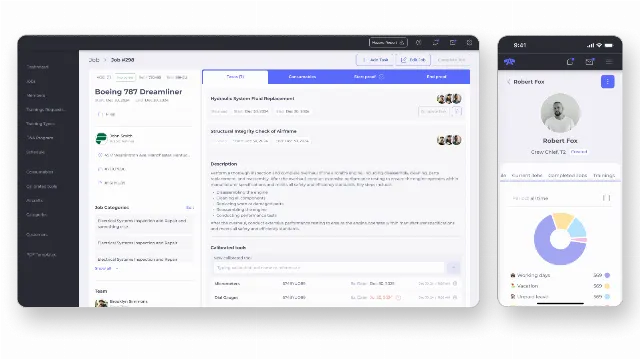
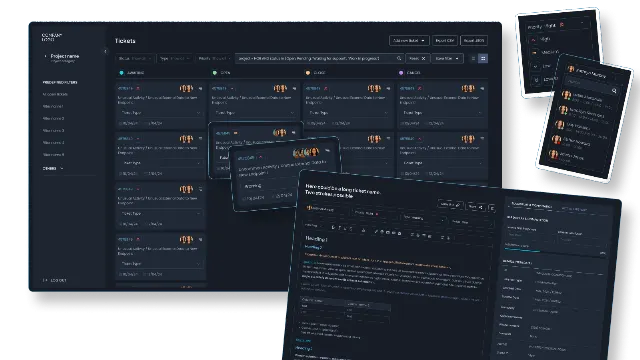
We are a software development company founded in 2020 that builds CRMs, ERPs and AI automation for companies in the US, UK and EU. Document flows are part of the systems we build: we developed an ERP for a US aircraft service company covering orders, warehouse inventory and regulatory compliance tracking, and a ticket CRM for a telecom support company in France that ingests alarms from third-party systems.
Every document project starts with a sample of your real documents and the checks your team already applies by hand. See our AI automation services for how we build, and our guide on which business processes to automate with AI first if you are still choosing where to start.