 Es
Es
 En
En
 Fr
Fr
 De
De
 It
It
 Uk
Uk
Which business processes should you automate with AI first?
Automate the processes that are frequent, mostly rule-based and cheap to correct when the AI is wrong. In practice the best first candidates for AI automation of business processes are document processing, lead qualification, support triage, recurring reporting and operations dispatch, because each has high volume, clear inputs and a human who can review exceptions.
AI automation here means using language or vision models to read unstructured input (emails, PDFs, chat messages, images), decide what it is, extract the fields that matter and trigger the next step in your systems. The model handles the messy reading; ordinary code handles the rules, permissions and writes. That split is what keeps these systems predictable. A process that is 90 percent reading and routing and 10 percent judgment is ideal: the model does the reading, a person keeps the judgment.
How do you score processes for AI automation?
Score each candidate process on volume, rule clarity, error cost, input format and data access, then start with the highest total. A simple 1 to 5 scale for each factor is enough to turn a long wish list into a ranked backlog in one workshop.
| Factor | Score 1 (poor candidate) | Score 5 (strong candidate) |
|---|---|---|
| Volume | A few cases per month | Hundreds or thousands per month |
| Rule clarity | Depends on experience and intuition | Written rules or a clear checklist exist |
| Error cost | One mistake is expensive and hard to undo | Mistakes are cheap and caught downstream |
| Input format | Varied, handwritten, poor quality | Emails, PDFs or forms with a known structure |
| Data access | Data in personal inboxes and spreadsheets | A system of record with an API |
| Time sensitivity | Nobody minds a day of delay | Delay costs sales, SLAs or customer trust |
Invert error cost when you add up the score, so that a cheap-to-fix process scores high. Anything that totals 24 or more out of 30 is usually a good pilot. Processes that score high on volume but low on data access often need a small system of record first, which is a valid project in itself.
Which processes typically score highest?
Five process families repeatedly come out on top in scoring workshops, across very different industries. The table summarizes what the AI does in each and what stays with people.
| Process | What AI does | What stays human | Typical first metric |
|---|---|---|---|
| Document processing (invoices, orders, forms) | Extracts fields, matches to records, flags mismatches | Approving exceptions and payments | Minutes per document, error rate |
| Lead qualification | Reads inbound requests, enriches, scores, drafts first reply | Sales conversation and pricing | Response time, qualified lead share |
| Support triage | Classifies tickets, detects urgency, routes, drafts answers | Complex and sensitive cases | Time to first response, misroutes |
| Recurring reporting | Pulls data, writes narrative summaries, highlights anomalies | Decisions based on the report | Hours per report cycle |
| Operations dispatch | Turns orders into tasks, assigns people or vehicles, sends updates | Overrides and edge cases | Time from order to assignment |
Document processing is often the fastest win because the input is well defined and results are easy to check against the source. Lead qualification pays off where inbound volume is high and response speed decides who wins the deal. Support triage is a safer first step than a customer-facing bot, and our guide on AI agents for customer service covers what comes after it. Reporting removes hours of copy-and-paste from managers. Dispatch is where automation turns into visible operational speed, as the two examples below show.
What does AI and workflow automation look like in operations dispatch?
Dispatch automation turns incoming orders into assigned, tracked tasks without someone making phone calls in between. Two of our projects show the pattern at different levels of autonomy.
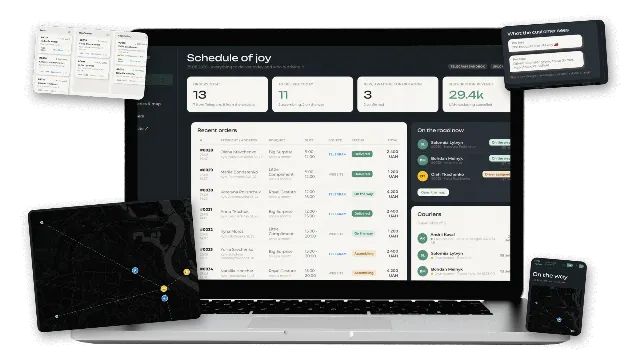
In the flower subscription service we built for a Kyiv studio, orders used to arrive through a landing page and chats, couriers were arranged by phone and nobody could tell where a bouquet was. We added an order API, a Telegram bot that takes the same order in an eight-step chat, and a CRM with an order board. Staff assign a courier in one click, either the studio's own courier or an Uklon Delivery driver requested through the API, which returns the driver, ETA and cost. Status callbacks move the order forward automatically, and the customer receives a Telegram message and a tracking link at every step. Peak-day deliveries can go to Uklon without a phone call.
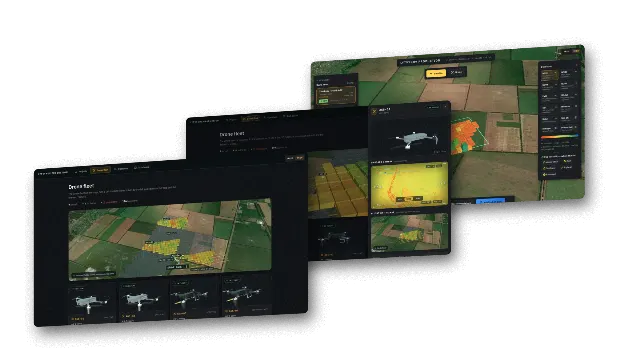
In our autonomous drone swarm R&D project, the dispatch step is fully automatic: field analysis produces treatment tasks, and the fleet picks them up as soon as an aircraft frees up, without a dispatcher. The operator sees every aircraft, task and assignment on one map. In that prototype the aircraft link is simulated while satellite and weather data are real, which is exactly how we recommend testing autonomous dispatch before it touches real assets.
The lesson from both: automation starts with a clear status model (new, assigned, on the way, done) and a system of record. The AI and integrations sit on top of that. Without it, there is nothing reliable to automate.
How do you estimate the ROI of AI automation?
Estimate ROI by comparing the monthly cost of the process today with the monthly cost after automation, then divide the build cost by the difference to get a payback period. Keep the math simple and replace assumptions with pilot data as soon as you have it.
A worked example with assumed numbers:
- Current cost: a team processes 2,000 supplier documents a month at 6 minutes each, which is 200 hours. At an assumed loaded cost of $40 an hour, that is $8,000 a month.
- After automation: the AI extracts and matches 80 percent of documents; people review exceptions at 3 minutes each (400 documents, 20 hours, $800) and spot-check 5 percent of the rest (about 8 hours, $320).
- Run cost: tokens, hosting and monitoring at an assumed $500 a month, plus maintenance at an assumed $500 a month.
- Monthly saving: $8,000 minus $2,120, about $5,880.
- Payback: at Lytvynov Production an automation like this typically costs from $10,000 for one AI step added to an existing system, and $10,000 to $20,000 when it also needs integrations and a review interface. A $15,000 build pays back in under three months. A typical US or UK agency quotes roughly 2.5 to 4 times more for the same scope, which stretches the payback accordingly.
Two things make ROI estimates wrong more often than anything else: assuming 100 percent automation, and forgetting the cost of errors in the current manual process. Late orders, missed leads and data entry mistakes are part of today's cost, and reducing them is often worth more than the hours saved. For how the run cost side adds up in more detail, see our AI agent development cost guide.
What should you prepare before starting an AI automation project?
Prepare a written description of the process, 30 to 100 real examples of its inputs and correct outputs, access to the systems involved, and a named owner on your side. These four items shorten any project by weeks.
- Process map: steps, decision points, who does what, and what "done" means.
- Examples: real documents, emails or requests with the correct result, including awkward ones. They become the evaluation set.
- System access: sandbox or test accounts for the CRM, ERP or helpdesk, and API documentation.
- Owner: a person who can say whether an output is right and who will review exceptions after launch.
- Rules for exceptions: what happens when the AI is unsure. Default to a human queue.
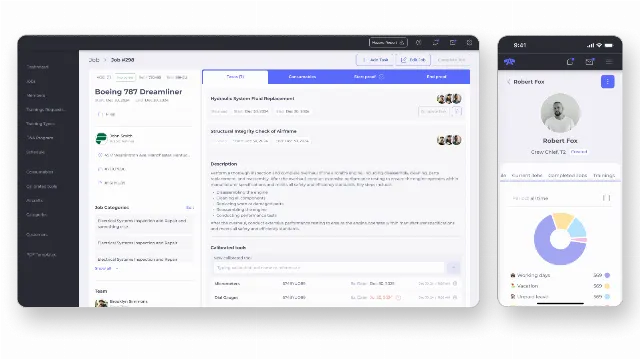
Where the process spans several departments, map the whole flow first even if you automate one step. Our custom ERP for a US aircraft service company brought orders, service scheduling, staff shifts, warehouse inventory and compliance into one platform; once work lives in one system like that, adding AI steps on top becomes much simpler.
What are the common mistakes in AI process automation?
The common mistakes are automating a broken process, skipping the human review step, and measuring nothing. Each one turns a promising pilot into a system people quietly work around.
- Automating chaos: if two employees handle the same case differently, the AI will be inconsistent too. Agree on the rules first.
- No exception path: the model will be unsure sometimes. Without a review queue, uncertain cases become silent errors.
- Prompt-only safety: limits such as payment ceilings or which records may be changed belong in code, not in instructions to the model.
- One big launch: roll out by document type, inbox or region, and measure each step.
- No owner after launch: models, suppliers' document layouts and APIs change. Somebody must review errors and update the evaluation set.
Should you use no-code tools or custom development?
Use no-code workflow tools when the process is simple, the systems have ready-made connectors and volume is modest. Choose custom development when you need your own permission model, complex business rules, high volume, or an internal tool your team works in every day.
Many companies do both: no-code for quick internal glue, custom code for the core process that touches money, customers or operations. Custom development also gives you control over which models run your data (OpenAI, Anthropic Claude or open models) and where it is stored. Our AI integration service covers adding these steps to existing products and back-office systems.
How we work on AI automation projects
We start with a short scoping call where we score your candidate processes with the framework above, pick one with a clear payback, and estimate build and run costs from your real volumes. You then get a fixed quote: a single AI step on an existing system starts from $10,000, and a dispatch or CRM automation with integrations typically lands at $10,000 to $25,000. We build on your existing systems where possible, add a small system of record where there is none, and launch with a human review queue and measurable targets.
Learn more on our AI automation services page, or contact us with a list of your top three time-consuming processes and we will tell you which one we would automate first.